A Structured Workflow for AI-Assisted Development
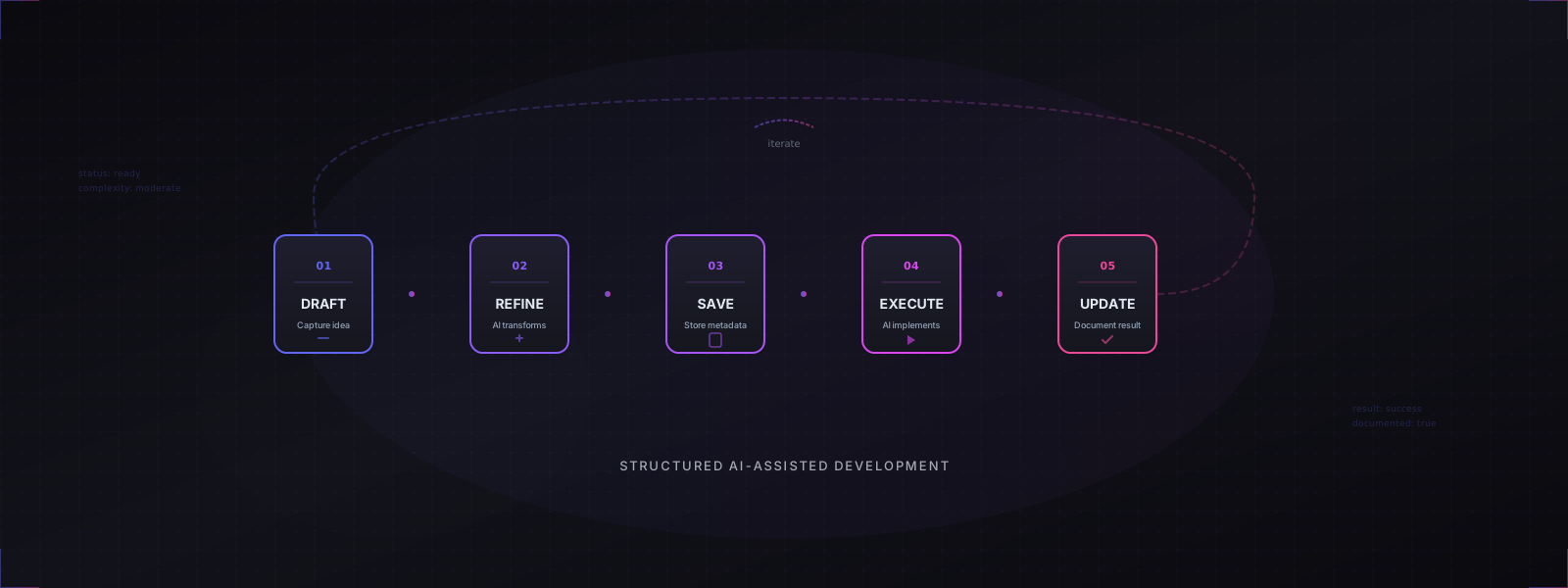
AI coding assistants like Claude and GitHub Copilot are powerful, but ad-hoc usage leads to scattered context, unreproducible results, and lost knowledge. This guide presents a 5-step workflow that transforms AI from a chaotic helper into a reliable, documented part of your development process.
- Draft - Capture your task as a rough prompt
- Refine - Use AI to transform it into a structured specification
- Save - Store with metadata for traceability
- Execute - Run the prompt with an AI agent
- Update - Document the outcome and iterate
Key Benefits
- Traceability: Every task is documented with metadata
- Knowledge Preservation: Prompts become searchable documentation
- Compounding Context: AI agents learn your project patterns over time
- Measurable Progress: Track success rates and identify blockers
The Problem
When using AI assistants without structure:
| Issue | Impact |
|---|---|
| Prompts scattered across chat histories | Context lost between sessions |
| No record of what worked | Repeating failed approaches |
| Inconsistent outputs | Unpredictable code quality |
| No dependency tracking | Tasks attempted out of order |
The Solution: Draft-Refine-Execute Loop
The workflow consists of 5 steps that create a repeatable, documented process:
graph TB
    Start([Task/Feature Idea]) --> Draft[1. Draft Rough Prompt]
    Draft --> |Share with AI| Refine[2. AI Prompt Refinement]
    Refine --> |Uses templates| Template{Format Complete?}
    Template --> |Yes| Save[3. Save to docs/prompts/]
    Template --> |No| Refine

    Save --> |NN-slug-name.md| Properties[Set Metadata:<br/>status: ready<br/>execution_result: pending]
    Properties --> Execute[4. Execute with AI Agent]

    Execute --> Result{Outcome}
    Result --> |Success| UpdateSuccess[5. Update: executed + success]
    Result --> |Partial| UpdatePartial[5. Update: executed + partial]
    Result --> |Failed| UpdateFailed[5. Update: executed + failed]
    Result --> |Blocked| UpdateBlocked[5. Update: ready + blocked]

    UpdateSuccess --> Done([Complete])
    UpdatePartial --> Notes[Document pending items]
    UpdateFailed --> Notes
    UpdateBlocked --> Notes
    Notes --> Done

    Done -.-> |Next task| Start
Quick Reference:
- Draft → Rough idea in plain language
- Refine → AI transforms into structured spec
- Save → Store with proper metadata
- Execute → AI agent implements
- Update → Document the outcome
Step 1: Draft Rough Prompt
Goal: Capture the raw idea quickly without worrying about structure.
Include:
- Core objective in plain language
- Relevant files or packages to reference
- Any constraints or requirements
- Incomplete thoughts are fine
Example:
Need to add JWT authentication to the backend. Should work with
the existing auth-db package. Check how other NestJS services
handle middleware. Don't break existing endpoints.
Step 2: AI Prompt Refinement
Goal: Transform rough notes into a comprehensive specification.
Share your draft with Claude/ChatGPT along with:
- Your project’s prompt template
- Project structure overview
- Context about existing patterns
The AI transforms your draft into:
- Complete metadata with all required properties
- Clear sections: Context, Requirements, Acceptance Criteria
- Cross-references to related documentation
- Specific file paths and function names
Step 3: Save with Structured Metadata
Goal: Store the refined prompt with traceable metadata.
Naming Convention: NN-descriptive-slug.md
NN= Sequential two-digit number (01, 02, 03…)descriptive-slug= Kebab-case task description
Key metadata to track:
- status: draft | ready | executed | deprecated
- execution_result: pending | success | partial | failed | blocked
- complexity: simple | moderate | complex | very-high
- dependencies: What must be done first
- tags: For searchability
Step 4: Execute with AI Agent
Goal: Run the refined prompt through Claude Code or GitHub Copilot.
Execution Checklist:
- Open your IDE with the project workspace
- Activate AI assistant
- Share complete prompt content
- Reference the prompt file path for context
- Monitor execution and provide feedback
AI Agent Responsibilities:
- Read and parse the full prompt
- Gather context from referenced files
- Implement required changes
- Create/modify files as specified
- Run tests if applicable
- Provide summary of changes made
Step 5: Update Status
Goal: Document the outcome for future reference.
| Result | Meaning |
|---|---|
success | Fully completed as specified |
partial | Some items completed, others pending |
failed | Could not complete due to errors |
blocked | Dependencies not yet satisfied |
Always document:
- What was actually implemented vs. planned
- Any issues or edge cases discovered
- Follow-up tasks spawned from this work
Best Practices
When Creating Prompts
| Do | Don’t |
|---|---|
| Include specific file paths | Use vague references (“the auth file”) |
| Define acceptance criteria | Leave success undefined |
| Mark dependencies explicitly | Assume execution order |
| Reference existing patterns | Ignore codebase conventions |
| Set realistic complexity | Underestimate scope |
When Executing
- Read Thoroughly: Parse the entire prompt before starting
- Gather Context: Review all referenced files and dependencies
- Follow Standards: Match existing code patterns
- Test Changes: Verify functionality after implementation
- Document Deviations: Note any changes from the original plan
Real-World Example
Task: Create Shared Authentication Database Package
Step 1 - Rough Draft:
Need to create a shared auth database package. Should have TypeORM
entities for users, maybe sessions. Needs to work with both backend
apps. Look at the be-config package for how shared packages are structured.
Step 2 - Refined: Saved as 06-auth-db-package.md with full metadata, entity specifications, migration requirements, integration steps, and acceptance criteria.
Step 3 - Executed: With Claude Code in VS Code
Step 4 - Status Updated:
- Result: Success
- Notes: Successfully created auth-db package with User and Session entities. Integrated with both backend apps. Added DatabaseService facade for clean repository access.
Result: ~15 minutes for a multi-hour task, with full documentation as a byproduct.
Workflow Variations
For Small Changes
- Skip formal prompt creation
- Document in commit messages
- Still update related docs if needed
For Exploration/Spikes
- Create prompt with
status: draft - Execute and update based on findings
- May spawn multiple refined prompts
For Bug Fixes
- Create prompts for complex bugs only
- Use
bugfixtag - Reference issue tracker links
Conclusion
This structured workflow transforms AI-assisted development from chaotic to systematic. By documenting every task with metadata, you create:
- A searchable knowledge base of what works
- Clear visibility into project progress
- Reproducible patterns for future tasks
- A feedback loop that improves over time
Start with the 5-step loop, adapt it to your needs, and watch your AI-assisted productivity compound.