Building an Obsidian Knowledge Base for AI-Assisted Development
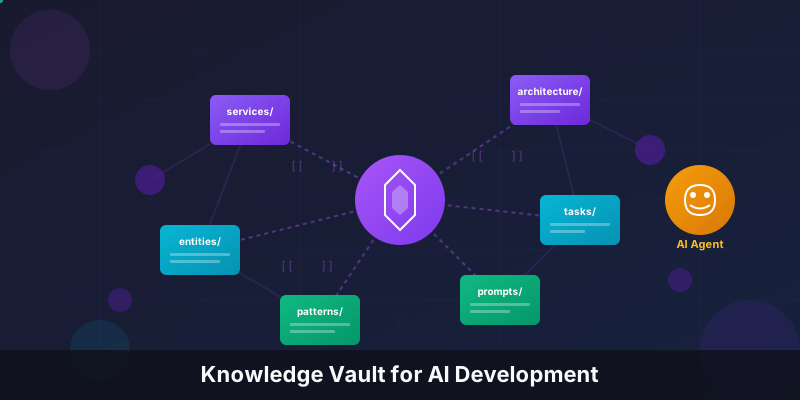
Building an Obsidian Knowledge Base for AI-Assisted Development
Modern AI coding assistants like Claude, GPT-4, and Copilot are remarkably capable -yet they share a fundamental limitation: they lack context about your system. They can write code, but they don’t understand your architecture decisions, domain models, service integrations, or the reasoning behind your patterns.
What if you could give AI agents a structured “brain” about your codebase?
This article documents an approach I’ve been developing: an Obsidian-based knowledge vault embedded directly in the repository, designed specifically to provide rich context to AI agents during development. The result is faster, more accurate AI-assisted development with dramatically reduced hallucinations.
The Problem: Context Scarcity
When you ask an AI assistant to implement a feature, several things can go wrong:
- Architecture Misalignment - The AI doesn’t know your established patterns and creates inconsistent code
- Integration Blindness - External services have specific configurations the AI can’t infer from code alone
- Domain Confusion - Entity relationships and business rules aren’t captured in code comments
- Decision Amnesia - The reasoning behind past architectural decisions is lost
Traditional documentation doesn’t solve this. README files go stale. Confluence pages live outside the repo. Wiki systems lack the interconnected structure AI needs to navigate.
The Solution: A Version-Controlled AI Knowledge Vault
The approach centers on creating a dedicated knowledge base directory in your repository -an Obsidian vault optimized for AI consumption. This vault:
- Lives with the code - Version controlled, always in sync
- Uses wiki-style linking - Documents reference each other, creating a navigable graph
- Follows strict templates - Consistent structure makes AI parsing reliable
- Separates concerns - “How to develop” vs. “What the code does”
- Provides layered context - From architecture down to specific tasks
Directory Structure
your-repo/
├── src/                    # Your application code
├── CLAUDE.md               # Development instructions (commands, style guides)
└── knowledge-vault/        # The AI knowledge base
    ├── FRAMEWORK.md        # Knowledge structure definition
    ├── INDEX.md            # Navigation hub
    ├── CLAUDE.md           # AI-specific vault guidance
    │
    ├── architecture/       # System design & decisions
    │   └── decisions/      # Architecture Decision Records (ADRs)
    │
    ├── services/           # External/internal service documentation
    │   ├── auth/
    │   ├── email/
    │   └── cache/
    │
    ├── entities/           # Domain models & database entities
    │   ├── user.md
    │   └── order.md
    │
    ├── tasks/              # Work items organized by status
    │   ├── active/
    │   ├── backlog/
    │   └── completed/
    │
    ├── patterns/           # Code patterns & conventions
    │   ├── backend/
    │   └── frontend/
    │
    ├── guides/             # How-to guides & runbooks
    ├── prompts/            # Reusable AI prompts
    ├── templates/          # Documentation templates
    └── meta/               # Vault conventions & metadata
Core Principles
1. Proximity to Code
Documentation lives in the same repository as the code it describes. When code changes, documentation can change in the same commit. This eliminates drift between reality and documentation.
git commit -m "Add rate limiting to API

- Implement token bucket algorithm
- Update api-design.md with rate limit docs
- Add ADR for rate limiting decision"
2. Layered Context
Information flows from broad to specific. AI agents can gather the appropriate level of detail:
Architecture (system design)
    ↓
Apps/Packages (implementation structure)
    ↓
Services (integration points)
    ↓
Entities (domain models)
    ↓
Tasks (specific work items)
When working on a task, an AI can traverse upward to understand architectural constraints or downward to understand implementation details.
3. Bidirectional Linking
Documents reference each other using wiki-style links. This creates a knowledge graph that AI agents can navigate:
## User Authentication

The authentication service [[services/auth/auth|Auth Service]] handles user
login and session management. It integrates with [[services/email/email|Email Service]]
for password reset flows.

Related entities:
- [[entities/user|User Entity]]
- [[entities/session|Session Entity]]

See also: [[architecture/decisions/2024-01-15-jwt-vs-sessions|ADR: JWT vs Sessions]]
4. Standardized Templates
Every document type has a template ensuring consistent structure. AI agents can reliably parse and extract information:
---
type: service
status: active
owner: backend-team
created: 2024-01-15
updated: 2024-06-20
tags: [authentication, security, jwt]
related:
  - "[[entities/user]]"
  - "[[services/email/email]]"
---

# Authentication Service

> Handles user authentication, session management, and token issuance.

## Overview

[2-3 sentence summary]

## Architecture

[System design, dependencies, data flow]

## Configuration

[Environment variables, feature flags]

## API Reference

[Methods, parameters, return types, exceptions]

## Usage Examples

[Concrete, runnable code examples]

## Error Handling

[Exception types, error codes, recovery strategies]

## References

[Code paths, external docs, related services]
5. Actionable Documentation
Every document answers: “What does an AI need to know to work with this?”
Bad documentation:
The email service sends emails.
Good documentation:
The email service wraps the Brevo API for transactional emails. It requires
BREVO_API_KEYin environment variables. UseEmailService.sendTransactional()for single emails with template ID from theEmailTemplateenum. Rate limited to 100 emails/minute per tenant.
Implementation Guide
Step 1: Create the Vault Structure
Start with the essential directories:
mkdir -p knowledge-vault/{architecture/decisions,services,entities,tasks/{active,backlog,completed},patterns,templates,meta}Create the framework document (FRAMEWORK.md) defining your knowledge structure. This is the “constitution” of your vault.
Step 2: Define Document Templates
Create templates for each document type. At minimum:
- service.md - For external/internal service integrations
- entity.md - For domain models and database entities
- task.md - For work items (Jira tickets, GitHub issues)
- adr.md - For Architecture Decision Records
Each template should include:
- YAML frontmatter with type, status, owner, dates, tags, and related links
- Standard sections appropriate for the document type
- Placeholder comments guiding content creation
Step 3: Establish Conventions
Document your conventions in meta/conventions.md:
# Vault Conventions

## File Naming
- Use kebab-case: `user-authentication.md`
- Tasks include ticket ID: `PROJ-123-implement-oauth.md`
- ADRs include date: `2024-01-15-database-selection.md`

## Linking
- Use wiki-links: `[[services/auth/auth]]`
- Include display text for clarity: `[[services/auth/auth|Auth Service]]`
- Link to sections: `[[services/auth/auth#Configuration]]`

## Code References
- File paths: `src/services/auth/auth.service.ts`
- With line numbers: `src/services/auth/auth.service.ts:42`
- With ranges: `src/services/auth/auth.service.ts:42-56`

## Status Values
- `active` - Currently in use, maintained
- `deprecated` - Being phased out
- `planned` - Not yet implemented
- `in-progress` - Currently being worked on
- `completed` - Finished work item
Step 4: Separate Development from Domain
Create two distinct entry points:
Root CLAUDE.md - How to develop:
- Repository structure
- Build and test commands
- Code style guidelines
- Git workflow
- Development environment setup
Vault CLAUDE.md - What the code does:
- System architecture
- Service integrations
- Domain models
- Business logic
- Task context
This separation lets AI agents quickly find the right type of information.
Step 5: Document Incrementally
Don’t try to document everything at once. Follow this priority:
- High-traffic services - The integrations developers touch most often
- Core entities - The domain models that define your system
- Active tasks - Current work items that need context
- Patterns - Coding conventions that should be followed consistently
- Architecture decisions - The “why” behind major choices
Each time you work on a feature, document what you learn. The vault grows organically.
Task Documentation: The Secret Weapon
The most powerful feature is task documentation. When starting work on a ticket, create a comprehensive task document:
---
type: task
status: in-progress
ticket: PROJ-456
assignee: developer-name
sprint: 2024-Q1-S3
created: 2024-01-20
---

# PROJ-456: Implement Rate Limiting for Public API

> Add rate limiting to prevent API abuse and ensure fair usage across tenants.

## Objective

Implement token bucket rate limiting for all public API endpoints with
configurable limits per tenant tier.

## Requirements

- [ ] Rate limit by API key (tenant identification)
- [ ] Different limits for Free/Pro/Enterprise tiers
- [ ] Return `429 Too Many Requests` with `Retry-After` header
- [ ] Log rate limit violations for monitoring

## Technical Design

### Approach

Use Redis-based token bucket algorithm via `rate-limiter-flexible` package.

### Configuration

| Tier       | Requests/min | Burst |
|------------|--------------|-------|
| Free       | 60           | 10    |
| Pro        | 300          | 50    |
| Enterprise | 1000         | 200   |

### Implementation Steps

1. Add Redis connection for rate limiter (separate from cache)
2. Create `RateLimiterMiddleware` in `src/middleware/`
3. Add tenant tier lookup from [[entities/tenant|Tenant Entity]]
4. Integrate with [[services/monitoring/monitoring|Monitoring Service]] for metrics
5. Add configuration to [[services/config/config|Config Service]]

## Acceptance Criteria

- Rate limiting applied to all `/api/v1/*` routes
- Correct tier limits enforced per tenant
- 429 responses include `Retry-After` header
- Rate limit events logged with tenant ID and endpoint

## Related

- [[architecture/decisions/2024-01-18-rate-limiting-strategy|ADR: Rate Limiting Strategy]]
- [[services/redis/redis|Redis Service]]
- [[entities/tenant|Tenant Entity]]
When an AI agent picks up this task, it has:
- Clear objectives and requirements
- Technical design decisions already made
- Links to related services and entities it can follow
- Concrete acceptance criteria to verify completion
AI Prompts Library
Include reusable prompts for common operations:
# Prompt: Service Quick Reference

## Purpose
Generate a quick reference card for a service.

## Prompt

Given the service at `{SERVICE_PATH}`, create a quick reference including:

1. **Purpose** - One sentence description
2. **Key Methods** - Main public methods with signatures
3. **Configuration** - Required environment variables
4. **Dependencies** - Other services this depends on
5. **Common Patterns** - Typical usage examples

Reference the existing documentation at [[services/{SERVICE_NAME}/{SERVICE_NAME}]]
for context.

## Variables
- `{SERVICE_PATH}`: Path to service directory
- `{SERVICE_NAME}`: Service identifier

## Expected Output
Markdown quick reference card following vault conventions.
Cross-Referencing Code and Documentation
Maintain bidirectional references between code and documentation:
In documentation:
## Implementation

The rate limiter is implemented in:
- `src/middleware/rate-limiter.middleware.ts` - Main middleware
- `src/services/rate-limiter/rate-limiter.service.ts:45-78` - Token bucket logic
- `src/config/rate-limits.config.ts` - Tier configurations
In code:
/**
 * Rate limiting middleware using token bucket algorithm.
 *
 * Configuration: RATE_LIMIT_* environment variables
 * Documentation: knowledge-vault/services/rate-limiter/rate-limiter.md
 *
 * @see knowledge-vault/architecture/decisions/2024-01-18-rate-limiting-strategy.md
 */
export class RateLimiterMiddleware implements NestMiddleware {
  // ...
}
Benefits in Practice
Reduced Hallucinations
When AI has explicit documentation about your authentication service, it won’t invent incorrect integration patterns. It reads your documented approach and follows it.
Faster Context Gathering
Instead of reading dozens of source files, AI can read one service document and immediately understand:
- What the service does
- How it’s configured
- How to use it correctly
- What errors to handle
Consistent Implementations
Documented patterns become the source of truth. When AI implements a new feature, it follows your established patterns rather than inventing new ones.
Knowledge Preservation
When team members leave, their knowledge doesn’t leave with them. Architectural decisions, integration quirks, and domain logic are captured in the vault.
Onboarding Acceleration
New developers (and AI agents) can quickly understand the system by navigating the knowledge graph rather than spelunking through code.
Tooling Integration
Obsidian
The vault is designed for Obsidian but works with any markdown editor. Obsidian provides:
- Graph view - Visualize document relationships
- Quick switcher - Fast navigation between documents
- Backlinks - See all documents linking to the current one
- Templates - Insert templates with a keyboard shortcut
- Search - Full-text search across all documents
VS Code
For developers preferring VS Code:
- Use
FoamorDendronextensions for wiki-link support - Configure workspace to include the vault
- Set up snippets for common templates
AI Integration
Reference the vault in your AI tool configuration:
# System Context

This repository includes a knowledge vault at `knowledge-vault/`.
When working on tasks:

1. Read `knowledge-vault/FRAMEWORK.md` for structure understanding
2. Check `knowledge-vault/INDEX.md` for navigation
3. Follow wiki-links to gather related context
4. Reference `knowledge-vault/patterns/` for coding conventions
5. Use templates from `knowledge-vault/templates/` when creating documentation
Anti-Patterns to Avoid
Over-Documentation
Not everything needs a document. Focus on:
- Integration points that aren’t obvious from code
- Decisions that need explanation
- Patterns that should be followed consistently
- Domain logic that isn’t captured in types
Stale Documentation
Documentation that drifts from reality is worse than no documentation. Strategies:
- Document at implementation time, not after
- Include documentation updates in PR review checklists
- Use code references so staleness is detectable
- Prefer smaller, focused documents over comprehensive ones
Premature Structure
Don’t create empty directories and templates hoping to fill them later. Let structure emerge from actual documentation needs.
Duplicating Code Comments
The vault should complement code, not duplicate it. If something is clear from well-written code, don’t repeat it in documentation.
Getting Started
- Create the vault directory in your repository
- Write FRAMEWORK.md defining your knowledge structure
- Create 3-5 templates for your most common document types
- Document one service end-to-end as your reference example
- Document your first task before starting implementation
- Iterate - refine templates and conventions as you learn what works
The vault doesn’t need to be comprehensive on day one. Start small, document what you’re working on, and let it grow organically. Within weeks, you’ll have a knowledge base that dramatically improves AI-assisted development.
Conclusion
An Obsidian knowledge vault transforms AI-assisted development from “AI that can write code” to “AI that understands your system and writes code that fits.” The investment in structured documentation pays dividends in:
- Fewer iterations to get correct implementations
- Reduced review cycles catching AI mistakes
- Preserved knowledge that compounds over time
- Smoother onboarding for new team members and AI models
The future of software development isn’t just AI writing code -it’s AI working with rich context about your specific system. A knowledge vault is how you provide that context.
This approach was developed through practical experience on a production monorepo. The patterns described have been refined through months of AI-assisted development across backend services, frontend applications, and infrastructure.