Debugging With AI: A Practical Field Guide
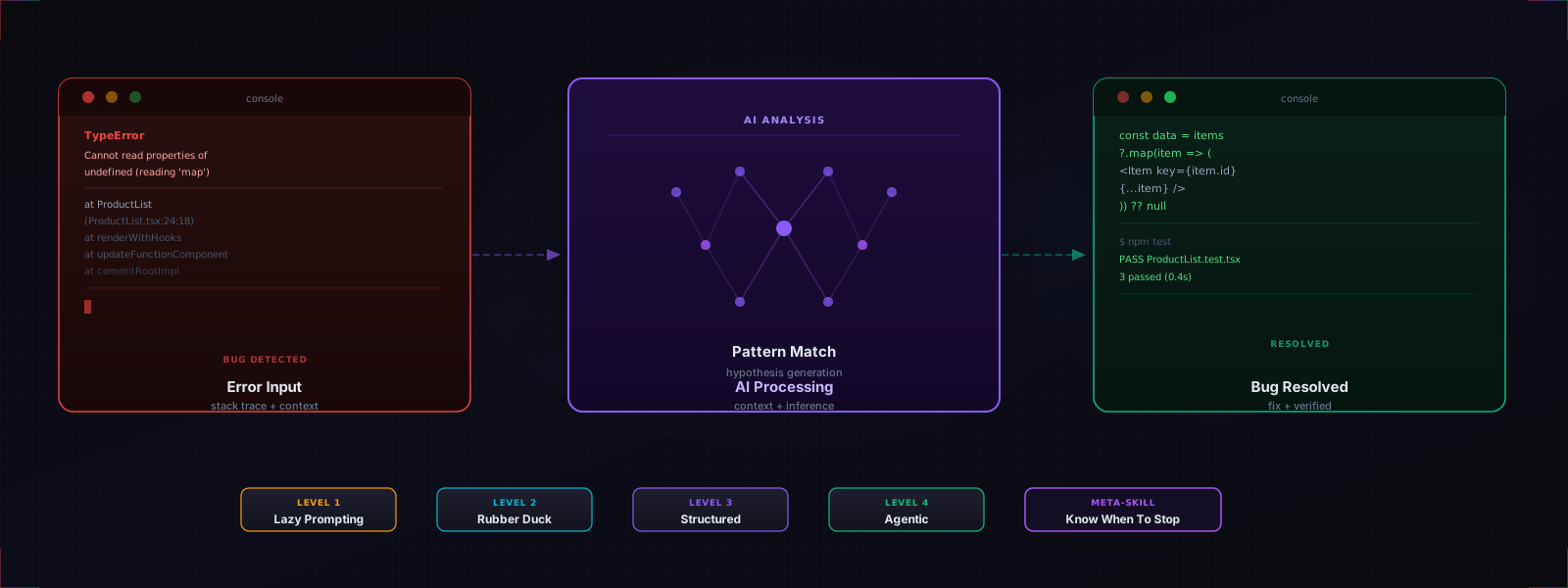
Nadia Makarevich ran an experiment: give Claude Opus three real debugging problems from a production React app and see how far it gets. One it solved cleanly. One it solved but with a fix that introduced a hydration bug on page refresh. One it got completely wrong, cycling through confident but incorrect suggestions until she had to stop and do it the old-fashioned way.
Her conclusion: AI doesn’t replace experienced debugging. But it changes what debugging looks like.
That’s the honest framing. AI is a capable debugging partner on a lot of surface-level problems and a liability on anything that requires systematic investigation of system-level behavior. The gap between those two isn’t about prompting better. It’s about knowing which category you’re in.
This is a breakdown of how to use AI for debugging effectively, organized from the lowest-effort approach to the most sophisticated.
Level 1: Lazy Prompting
The zero-effort approach: paste the error into a chat window and send it.
Andrew Ng calls this “lazy prompting,” and it works better than it has any right to. LLMs have been trained on more stack traces, error messages, and debugging threads than any human will ever read. For surface-level problems like cryptic TypeScript errors, unfamiliar library exceptions, and clear-cut syntax issues, the model usually knows what the error means and how to fix it before you’ve finished typing your question.
TypeError: Cannot read properties of undefined (reading 'map')
    at ProductList (ProductList.tsx:24:18)
Paste that, press enter, get a fix. No context needed. The model fills in the most statistically common cause and usually lands on something reasonable.
Where it breaks down: the moment your bug isn’t a standard pattern. If the error message is misleading, if the root cause is structural rather than local, or if the fix requires understanding how two systems interact, lazy prompting starts hallucinating with confidence. The model still sounds certain. It’s just wrong.
Level 2: The AI Rubber Duck
Rubber duck debugging is the practice of explaining your code out loud to an inanimate object. The act of articulation forces clarity. You strip away assumptions, reconstruct what you think the code does, and somewhere in that narration you hear yourself say the wrong thing.
AI makes the duck talk back. That’s a significant upgrade.
The technique: instead of asking the AI to fix your bug, explain the bug to it. Walk through what the code is supposed to do, what it’s actually doing, and what you’ve already tried. Don’t paste code first. Describe the problem in plain language, the way you’d explain it to a colleague.
A few things happen when you do this:
- You find the bug before the AI responds. The structured articulation surfaces the contradiction in your own mental model. This happens more often than you’d expect.
- The AI asks clarifying questions. Good models will probe your assumptions: “What does the data look like at that point?” “Is this running server-side or client-side?” Those questions are valuable even if the model’s eventual answer isn’t.
- You’re forced to reason first. Jumping straight to “fix my code” skips the diagnostic step. Explaining the problem doesn’t.
This mode works best for bugs where you’re not sure what you’re looking at yet. It’s debugging as a thinking tool rather than a fix-generation service.
Level 3: Structured Debugging Prompts
Once you know what the bug is and you’re ready to involve the AI in solving it, context quality determines output quality.
A structured debugging prompt includes:
- What the code is supposed to do: the intent, not just the code
- The failing case: the specific input or condition that triggers the bug
- Expected vs. actual behavior: stated explicitly, not implied
- What you’ve already tried: so the model doesn’t repeat it
- Relevant code snippets: the function itself plus any callers or dependencies that matter
I have a React component that fetches user data on mount and displays it in a table.
The bug: on the second render (after a state update unrelated to the fetch), the table
briefly shows stale data before updating.

Expected: data stays consistent across renders
Actual: table flickers and shows previous data for ~100ms

I've already checked: it's not a race condition (the second fetch finishes first),
and the state update does trigger a re-render correctly.

Here's the component: [code]
Here's the parent state update that triggers the issue: [code]
The difference between this and lazy prompting isn’t just quality of output. It’s the rubber duck effect from Level 2 applied systematically. Writing a good debugging prompt forces you to characterize the bug precisely. That precision often contains the answer.
The verify loop: when you get a fix, don’t implement it blindly. Feed the result back:
“I tried that, but now I’m getting this error instead: [new error]”
This iterative loop (implement, observe, feed back) is significantly more reliable than accepting the first response. Each iteration gives the model ground truth about your actual environment rather than its statistical model of environments like yours.
Level 4: Agentic Debugging
The emerging frontier: AI with real debugger access.
Microsoft Research’s debug-gym is the clearest demonstration of this. Rather than giving an agent code and asking it to reason about bugs statically, debug-gym equips agents with actual debugging tools: breakpoints, variable inspection, test creation, and code navigation across a full repository. The agent doesn’t guess what the state is at line 47. It runs the code, sets a breakpoint at line 47, and reads the state.
The results are significant: Claude 3.5 Sonnet improved from 37.2% to 48.4% success rate on complex real-world debugging problems when given these tools. That’s a 30% relative improvement, and it comes from the same principle that makes human debugging work: active information seeking rather than pattern matching.
In practice, you can approximate this today:
Browser DevTools MCP: Addy Osmani’s workflow uses a Chrome DevTools MCP integration that gives AI agents direct access to your browser’s DOM, console logs, network traces, and performance data. Instead of pasting screenshots or describing what you’re seeing, the agent can inspect what’s actually happening in the runtime. This is the closest thing to an autonomous debugger currently available outside research environments.
Test-driven debugging: Have the AI write a failing test that reproduces the bug, then fix the code until the test passes. This gives the model an objective signal (tests pass or they don’t) rather than relying on its static analysis of the problem.
Error log feedback loops: In Claude Code, the pattern is to run the test suite after implementing a task and feed failures back to the model immediately. The error log is ground truth; the model’s job is to close the gap between it and green.
The Failure Mode to Recognize Early
There’s a pattern that emerges when you’ve been in a debugging session with AI too long: the model starts cycling.
Each response sounds confident and plausible. Each proposed fix addresses something real but not the actual root cause. You implement it, the bug persists or mutates, you report back, and the model generates a new explanation that contradicts the previous one without acknowledging the contradiction.
Research puts numbers on this: AI debugging effectiveness follows an exponential decay curve. After a few unsuccessful iterations, the model’s ability to find the actual bug drops by 60-80%. The model isn’t getting smarter from your feedback in these cases. It’s running out of plausible standard patterns to try and falling back on increasingly generic suggestions.
The signal to watch for: explanations that keep shifting without building on each other. In Makarevich’s experiment, the double-loading skeleton bug was solved with useSuspenseQuery, which worked, but introduced a hydration mismatch the model didn’t flag. The redirect error was never solved at all. The model cycled through confident but wrong suggestions until she stepped back, removed components systematically, and found the root cause herself.
The redirect bug turned out to be a known issue with combining Server Actions and Suspense boundaries. No amount of prompting was going to surface that. It required GitHub issue research and a systematic elimination approach that only a human who knows to look at the ecosystem level can execute.
What AI Is Actually Good At
To be precise about where the leverage is:
| Strengths | Weaknesses |
|---|---|
| Known error patterns | System-level behavior |
| Syntax and type errors | Cross-component architectural bugs |
| Explaining unfamiliar code | Library-specific edge cases requiring doc research |
| Generating test cases | Bugs requiring runtime investigation |
| Stack trace interpretation | Bugs requiring elimination to isolate |
| First-pass fix suggestions | Subtle state management timing issues |
The pattern: AI is strong on pattern recognition and weak on systematic investigation. Most bugs are pattern recognition. Some bugs (the hard ones) aren’t.
The Meta-Skill
Makarevich’s conclusion is worth quoting directly: “The skill here isn’t knowing how to prompt better. It’s knowing when to stop prompting and start thinking.”
That’s the thing no prompting guide will tell you. There’s a moment in every difficult debugging session where continuing to iterate with the AI is the wrong move. The model has shown you what it knows. It’s pattern-matched everything it has. Further iteration isn’t going to produce new signal. It’s going to produce more confident wrong answers.
That moment is when you switch modes entirely:
- Stop explaining. Start eliminating.
- Remove components until the bug disappears. That’s your root cause.
- Read the library source code. Not the docs. The source.
- Search GitHub issues for your specific error. Someone else hit it.
- Profile the actual runtime, not the code you think is running.
These techniques don’t involve AI at all. They’re the same techniques that worked before LLMs existed. The skill that matters now is knowing when to use them, which means recognizing when the AI has reached its pattern-matching ceiling and you need to take back control.
The developers getting the most out of AI debugging aren’t the ones who’ve learned to prompt better. They’re the ones who’ve learned to read the session, to recognize when AI is helping them think and when it’s just producing noise, and to switch between modes without friction.
If you’re building a more systematic AI development workflow, A Structured Workflow for AI-Assisted Development covers how to bring the same rigor to feature work. From CLAUDE.md to MCP goes deeper on the infrastructure layer.