From CLAUDE.md to MCP: Building a Complete AI Development Ecosystem
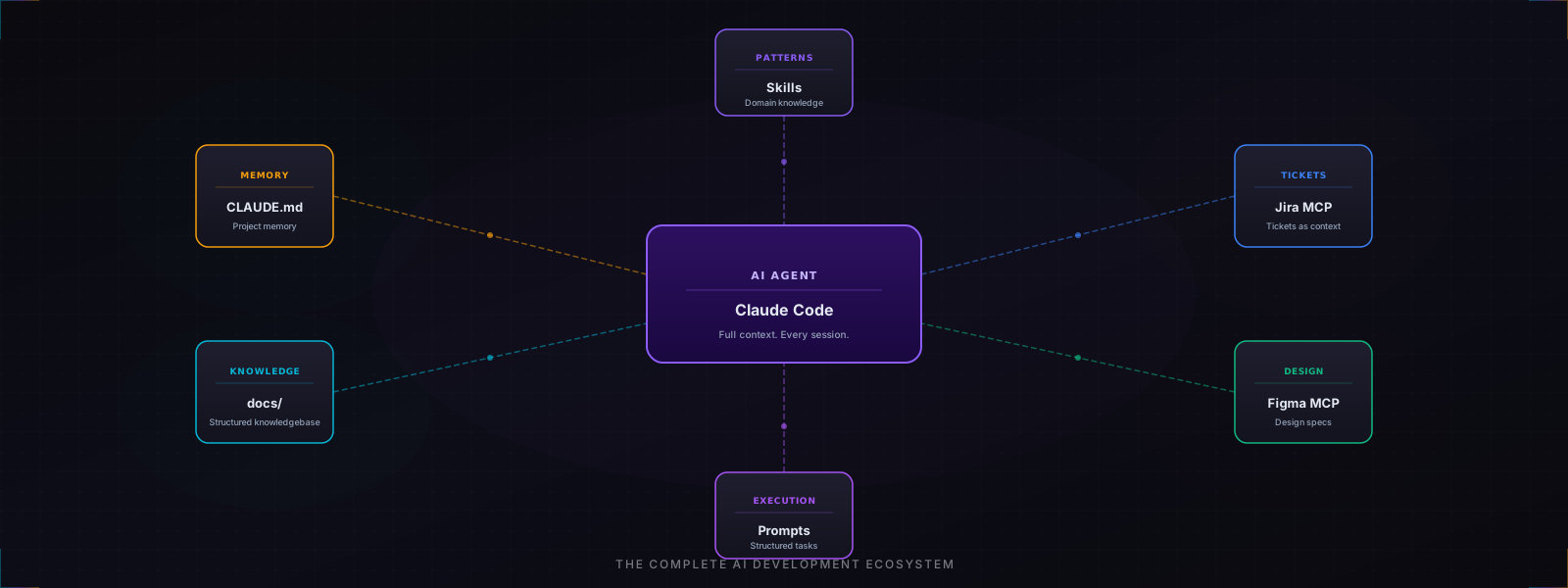
Most AI development content focuses on prompts. Write a better prompt, get better code. That advice isn’t wrong, but it addresses the wrong bottleneck on complex projects.
The real constraint isn’t prompt quality. It’s context. An AI agent writing code in a large production codebase needs to know your architecture patterns, your naming conventions, your service integrations, the design system it should match, and the specific ticket it’s implementing. Without that, every session starts from scratch and the output regresses to generic patterns that don’t fit your system.
This is a write-up of the ecosystem I built around Claude Code on a production SaaS project: a Turborepo monorepo with a NestJS API, a Next.js frontend, AWS infrastructure, and a team working across multiple regional deployments. The goal was to go from “AI can write code” to “AI can reliably implement production features end-to-end.”
The Architecture
The system has eight layers. Each one works independently, but the compounding effect of all of them together is where the real productivity gain lives.
flowchart TB
    subgraph Context["Context Layer"]
        CM["CLAUDE.md<br/>Project Memory"]
        DOCS["docs/<br/>Knowledgebase"]
    end

    subgraph Integration["Integration Layer"]
        JIRA["Jira MCP<br/>Tickets"]
        FIGMA["Figma MCP<br/>Design Specs"]
    end

    subgraph Execution["Execution Layer"]
        PROMPTS["Structured<br/>Prompts"]
        SKILLS["Custom<br/>Skills"]
        HOOKS["Auto-Activation<br/>Hooks"]
        AGENTS["Autonomous<br/>Agents"]
    end

    AI["AI Agent<br/>(Claude Code)"]

    CM --> AI
    DOCS --> AI
    JIRA --> AI
    FIGMA --> AI
    PROMPTS --> AI
    SKILLS --> AI
    HOOKS --> AI
    AGENTS --> AI

    style CM fill:#f59e0b,color:#fff
    style DOCS fill:#f59e0b,color:#fff
    style JIRA fill:#3b82f6,color:#fff
    style FIGMA fill:#3b82f6,color:#fff
    style PROMPTS fill:#8b5cf6,color:#fff
    style SKILLS fill:#8b5cf6,color:#fff
    style HOOKS fill:#8b5cf6,color:#fff
    style AGENTS fill:#8b5cf6,color:#fff
    style AI fill:#ef4444,color:#fff
Layer 1: CLAUDE.md
CLAUDE.md at the repository root is the single most impactful file. Claude Code loads it automatically at the start of every session.
The key insight is separating how to develop from what the code does. CLAUDE.md covers the former:
- Terminology table: mappings between UI language and codebase identifiers (e.g. “Job Ad” ->
JobAd, “Organization” ->organizationentity). Without this, AI consistently uses the wrong names. - Repository structure: every app and package, one line each.
- Architecture patterns: the
Controller -> Service -> Facade -> Repository -> Mapperchain, which logger to use, which HTTP exception class, which shared packages to import from. - Common commands: dev server, test runner, lint, build. AI runs these without asking.
- Known quirks: authentication setup, environment variable precedence, anything that isn’t obvious from code alone.
The result: a new session picks up exactly where the last one left off. No re-explaining the stack, no re-establishing conventions.
Layer 2: The Structured Knowledgebase
CLAUDE.md covers workflow. The docs/ directory covers the system itself: 38+ markdown files organized by topic:
docs/
├── architecture.md          # Deployment diagrams, tenant configuration
├── database-integration.md  # ORM patterns, repository layer
├── security-audit.md        # Security findings and mitigations
├── e2e-test-analysis.md     # E2E coverage map
├── open-questions.md        # Unresolved design decisions
├── references/
│   ├── http-exceptions.md   # Error codes and usage
│   └── swagger-patterns.md  # API documentation conventions
├── prompts/                 # Executed AI prompts (62+)
├── tickets/                 # Jira-synced task files
└── figma/                   # Design system map and token reference
These files are referenced explicitly when starting work on any feature. Rather than asking the AI to read the entire codebase, I hand it the two or three docs relevant to the task. This gives it a precise mental model in seconds.
The open-questions.md file deserves special mention. Explicitly documenting unresolved decisions prevents AI from making them implicitly, and badly.
Layer 3: Structured Prompts
Prompts are stored as versioned markdown files in docs/prompts/, numbered sequentially (01-setup.md, 02-auth.md, …, 62-stats-integration.md). Each has YAML frontmatter tracking status, complexity, dependencies, and execution result.
---
title: Add statistics endpoint for job ad views
id: 58-ad-stats-endpoint
status: executed
execution_result: success
complexity: moderate
target: backend
dependencies:
  - 14-job-entity-rework
blocks:
  - 62-ad-stats-table-integration
---
The workflow: draft a rough idea, ask AI to refine it into a structured spec using the template, save it with proper metadata, then execute. After execution, update the status and add notes.
This creates a fully auditable log of every significant AI-assisted task: what was attempted, what succeeded, what was blocked. The dependency graph prevents tasks from being executed out of order.
Complexity limits are enforced strictly:
highandvery-highprompts are never executed directly. They must be decomposed intomoderateorlowsubtasks first. This single rule prevents most failed or partial executions.
Layer 4: Jira MCP
Tickets are stored locally as markdown files in docs/tickets/, synced bidirectionally with Jira via the Atlassian MCP plugin.
docs/tickets/
├── hierarchy.md                        # MermaidJS story→task→subtask diagram
├── pages/
│   ├── dashboard/
│   │   ├── PROJ-479-main-dashboard.story.md
│   │   └── PROJ-490-statistics.task.md
│   └── job-entry/
│       ├── step-1/
│       └── step-2/
└── shared-components/
    └── PROJ-561-job-card.subtask.md
Each ticket file follows a template with metadata, a Figma design reference, acceptance criteria, and a definition of done. When implementing a feature, I hand the AI the ticket file directly; it has full context on what needs to be built, what the design looks like, and what “done” means.
hierarchy.md is a MermaidJS diagram that visualises the full story -> task -> subtask relationship across all Jira tickets. Each epic, story, task, and subtask appears as a node, with arrows showing parent-child dependencies. It’s the single place where the complete scope of a feature, from the top-level story down to every subtask, is visible at a glance, and it’s what prevents implementing a subtask without understanding its parent context.
graph TB
    subgraph Workflow["Ticket Lifecycle"]
        JIRA_BOARD["Jira Board"] -->|MCP sync| LOCAL["docs/tickets/<br/>local markdown"]
        LOCAL -->|read by| AI_IMPL["AI implements<br/>feature"]
        AI_IMPL -->|completion note| JIRA_BOARD
    end

    LOCAL -->|visualised in| HIERARCHY["hierarchy.md<br/>story→task→subtask<br/>MermaidJS diagram"]

    style JIRA_BOARD fill:#3b82f6,color:#fff
    style LOCAL fill:#8b5cf6,color:#fff
    style AI_IMPL fill:#ef4444,color:#fff
    style HIERARCHY fill:#10b981,color:#fff
The practical benefit: implementing a feature starts with reading the ticket file, not opening a browser. There is no context-switching between project management and development.
Layer 5: Figma MCP
A docs/figma/FIGMA-MAP.md file indexes every page, component, and frame in the Figma file with direct URLs. Separate files for dashboard views, form pages, custom components, Flowbite components, and the style guide.
When implementing a UI feature, the workflow is:
- Look up the component in
FIGMA-MAP.md - Use the Figma MCP to extract screenshot, design context, and variable definitions
- Map Figma design tokens to the project’s Tailwind token system
- Generate the component with exact spacing, color, and typography values
A dedicated apps/playground/ Next.js app serves as a translation layer: each design system component is implemented as a standalone showcase there first, before being wired into the main app. This makes visual fidelity easy to verify in isolation.
The strict rule: Figma token values are always mapped to project tokens, never used as inline values. This keeps the design system consistent and prevents token drift.
Layer 6: Custom Skills
Skills are domain-specific knowledge packages stored in .claude/skills/. Each skill is a SKILL.md file containing patterns, conventions, and best practices for a specific area of the codebase.
Available skills:
/backend-dev: NestJS patterns: module structure, service conventions, GDPR-compliant logging, HTTP exception codes, multi-tenant request decorators/frontend-dev: Next.js patterns: TanStack Query setup, query key conventions, service layer structure, context usage/shared-types: DTO/Zod validator patterns, domain type conventions/figma-sync: Full Figma-to-code workflow with token mapping instructions/ticketing: Ticket creation templates and hierarchy update rules/verify: Runs lint, test, and build before committing/push: Git commit and push workflow with conventional commit format
Skills function as opt-in context injection. Invoking /backend-dev before asking AI to build a controller ensures every pattern, from the logger to the response interceptor to the error codes, matches the rest of the codebase.
Layer 7: Auto-Activation Hooks
A UserPromptSubmit hook runs on every message. It reads the user’s prompt, matches against a skill-rules.json file, and suggests relevant skills before the AI responds.
{
  "backend-dev": {
    "keywords": ["controller", "service", "repository", "entity", "endpoint"],
    "intentPatterns": [
      "(create|add|implement).*?(route|endpoint|controller)",
      "(fix|handle).*?(error|exception|backend)"
    ]
  }
}
The effect: skills get loaded before they’re needed, not after the AI has already generated code in the wrong pattern. A prompt like “add a job statistics endpoint” automatically surfaces /backend-dev before any code is written.
A PostToolUse hook also tracks every file edited during a session, creating a change log that’s useful for reviewing what happened across long sessions.
Layer 8: Autonomous Agents
For specific recurring tasks, .claude/agents/ contains agent definitions that run autonomously:
auto-error-resolver: Fixes TypeScript compilation errors without manual guidancefrontend-error-fixer: Debugs React runtime errors from browser console outputcode-architecture-reviewer: Reviews recently changed files against established patternsdata-layer-architect: Designs DTO/entity/mapper structures for new features
These are invoked for well-defined tasks where the scope is clear. The auto-error-resolver in particular eliminates a significant source of interruption: TypeScript errors after a large refactor can now be resolved with a single agent invocation rather than a manual debugging session.
The Full Development Loop
graph LR
    TICKET["Read ticket<br/>docs/tickets/"] --> DESIGN["Sync Figma<br/>design context"]
    DESIGN --> PROMPT["Draft prompt<br/>docs/prompts/"]
    PROMPT --> SKILL["Invoke skill<br/>/backend-dev or<br/>/frontend-dev"]
    SKILL --> EXECUTE["AI implements<br/>with full context"]
    EXECUTE --> VERIFY["/verify<br/>lint + test + build"]
    VERIFY --> PUSH["/push<br/>conventional commit"]
    PUSH --> UPDATE["Update ticket<br/>+ prompt status"]

    style TICKET fill:#3b82f6,color:#fff
    style DESIGN fill:#10b981,color:#fff
    style PROMPT fill:#8b5cf6,color:#fff
    style SKILL fill:#f59e0b,color:#fff
    style EXECUTE fill:#ef4444,color:#fff
    style VERIFY fill:#475569,color:#fff
    style PUSH fill:#475569,color:#fff
    style UPDATE fill:#475569,color:#fff
The key property of this loop: every step is documented. Tickets track what needs to be built. Prompts track how it was built. Skill invocations are logged. Commit messages follow the ticket key. After the fact, any feature can be reconstructed: what the design said, what the prompt specified, what the AI produced, what the outcome was.
Observations
After 62+ executed prompts and 100+ ticket files:
What works well:
- Complexity limits on prompts dramatically reduce failed executions. Decomposing into smaller tasks first takes 10 minutes but saves hours of untangling half-executed large prompts.
- CLAUDE.md pays for itself on the first session. The time spent writing it is recovered the first time AI correctly uses the right logger, the right error class, and the right import path, without being told.
- Figma MCP + FIGMA-MAP.md eliminates an entire category of design-to-code translation errors. Token drift, wrong spacing values, and incorrect border radii stop happening when the source of truth is explicit and machine-readable.
What takes discipline:
- Keeping
hierarchy.mdupdated. Every new ticket needs to be added to the MermaidJS diagram, easy to skip when moving fast, and it drifts within a week if you do. - Updating prompt status after execution. The metadata is only valuable if it’s accurate.
- Not over-documenting. The knowledge base should answer “what does AI need to know to work here?” not “what is every aspect of the system?”
The Compounding Effect
None of these layers are particularly complex in isolation. A CLAUDE.md file is just text. Prompt files are markdown. Skills are documentation. But their value compounds: a session that has CLAUDE.md + a relevant skill + a structured prompt + a ticket with a Figma reference produces qualitatively different results than the same session with any single piece missing.
The underlying principle is that AI quality is bounded by context quality. Tools, architecture, and code style affect the ceiling. Context determines where you actually operate relative to that ceiling.
Previous posts in this series: A Structured Workflow for AI-Assisted Development covers the prompt lifecycle in detail. Building an Obsidian Knowledge Base for AI-Assisted Development covers the knowledge vault structure.